
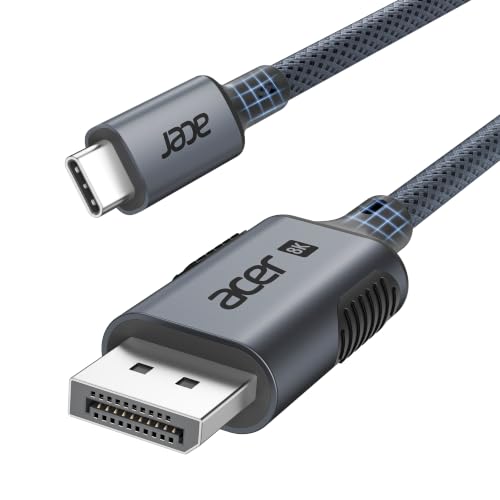
Acer USB C to DisplayPort Cable (8K@60Hz 4K@240Hz), Type-C Thunderbolt 3/4/5 DP 1.4 HDR MST Freesync Compatible with MacBook Pro M5, Mac mini M4, iPad Air, iMac, iPhone 17, XPS, Galaxy S26(2m)
Featured

|
£ 15.99 |
To Shop
|

|
£ 15.99 |
To Shop
|
| COMPARE ALL WEBSHOPS (2) | ||
 Description
Amazon
【8K@60Hz】Acer USB-C to Display Port 1.4 cable supports resolutions up to 8K@60Hz and backward compatible with 4K@240/144/120/60Hz, 2K@240/144/120Hz, and 1080P@240Hz/120Hz, meeting your diverse needs. It supports HDR, HDCP 2.3, and eARC for more vibrant colors and a more realistic audiovisual. 【Tear-Free & Smoother】Acer USB-C to DP 1.4 cable supports bandwidths up to 32.4Gbps and is compatible with G-SYNC and FreeSync, effectively reducing screen tearing and stuttering for a smoother, stable visual experience. It supports VRR and ALLM, comprehensively enhancing the performance of FPS, AAA Games, and MOBA games. 【Display Modes】Acer USB Type-C to Display Port cable supports mirror mode, extended mode, MST daisy-chain mode, Apple Clamshell mode, and Samsung Dex mode. MST Daisy-chain mode easily handles multiple tasks and reduces cable clutter. It meets your needs from office work to professional video editing. 【Durable Design】Acer Thunderbolt to Display Port 1.4 cable features an aluminum shell that prevents cracking and heat dissipation, making it 10X more durable than cheap, fragile plastic shells. Anti-slip design makes plugging and unplugging easy. The braided cable effectively prevents wear and hardening, withstanding over 30,000 bends. 【Wide Compatibility】Acer 8K Thunderbolt to DP 1.4 cable is compatible with devices including MacBook Pro M5/M4, MacBook Air/Neo, iMac, Mac Mini, Mac Studio, iPad Air, iPad Pro, iPad mini, Dell XPS 17/15/13, Surface Book, Surface Laptop, Surface Pro/Go, HP Chromebook, Pixelbook, Galaxy Tab S11/S10, iPhone 17/16/15, Galaxy S26/S25/S24, Pixel 10, Steam Deck, ROG Ally, and more. (Please note that if you are using an 8K monitor, please ensure that both your computer and monitor support 8K.) 【What You Get】You get a 2-meter Acer USB-C to Display Port Cable (8K@60Hz), our friendly 24-hour service, and a 12-month guarantee. Please rest assured that we stand behind our products and customers. 【Important Notes】① Display Port differs from HDMI & Mini DP. Please confirm your device's interface type before use. ② USB-C to DP cable is unidirectional and only supports transmitting signals from USB-C devices (MacBook/iPad) to a Display Port monitor. Reverse use or connecting a USB-C display is not supported. ③ Some iPadOS do not support dual-screen expansion (e.g., the 2021 M1 and 2022 M2). If you encounter compatibility issues, we recommend upgrading to iPadOS 16.2 or later.


 Description
(1)
Description
(1)
【8K@60Hz】Acer USB-C to Display Port 1.4 cable supports resolutions up to 8K@60Hz and backward compatible with 4K@240/144/120/60Hz, 2K@240/144/120Hz, and 1080P@240Hz/120Hz, meeting your diverse needs. It supports HDR, HDCP 2.3, and eARC for more vibrant colors and a more realistic audiovisual. 【Tear-Free & Smoother】Acer USB-C to DP 1.4 cable supports bandwidths up to 32.4Gbps and is compatible with G-SYNC and FreeSync, effectively reducing screen tearing and stuttering for a smoother, stable visual experience. It supports VRR and ALLM, comprehensively enhancing the performance of FPS, AAA Games, and MOBA games. 【Display Modes】Acer USB Type-C to Display Port cable supports mirror mode, extended mode, MST daisy-chain mode, Apple Clamshell mode, and Samsung Dex mode. MST Daisy-chain mode easily handles multiple tasks and reduces cable clutter. It meets your needs from office work to professional video editing. 【Durable Design】Acer Thunderbolt to Display Port 1.4 cable features an aluminum shell that prevents cracking and heat dissipation, making it 10X more durable than cheap, fragile plastic shells. Anti-slip design makes plugging and unplugging easy. The braided cable effectively prevents wear and hardening, withstanding over 30,000 bends. 【Wide Compatibility】Acer 8K Thunderbolt to DP 1.4 cable is compatible with devices including MacBook Pro M5/M4, MacBook Air/Neo, iMac, Mac Mini, Mac Studio, iPad Air, iPad Pro, iPad mini, Dell XPS 17/15/13, Surface Book, Surface Laptop, Surface Pro/Go, HP Chromebook, Pixelbook, Galaxy Tab S11/S10, iPhone 17/16/15, Galaxy S26/S25/S24, Pixel 10, Steam Deck, ROG Ally, and more. (Please note that if you are using an 8K monitor, please ensure that both your computer and monitor support 8K.) 【What You Get】You get a 2-meter Acer USB-C to Display Port Cable (8K@60Hz), our friendly 24-hour service, and a 12-month guarantee. Please rest assured that we stand behind our products and customers. 【Important Notes】① Display Port differs from HDMI & Mini DP. Please confirm your device's interface type before use. ② USB-C to DP cable is unidirectional and only supports transmitting signals from USB-C devices (MacBook/iPad) to a Display Port monitor. Reverse use or connecting a USB-C display is not supported. ③ Some iPadOS do not support dual-screen expansion (e.g., the 2021 M1 and 2022 M2). If you encounter compatibility issues, we recommend upgrading to iPadOS 16.2 or later.
 Product specifications
 Related results


