


£ 27.76

Sponsored links
|
|
£ 27.76 |
To Shop
|

|
£ 27.76 |
To Shop
|
| COMPARE ALL WEBSHOPS (2) | ||
 Description
Compare webshops (2)
Sponsored links · Some shops pay us a fee
£ 27.76
£ 27.76
Shops with other sizes
Description
(1)
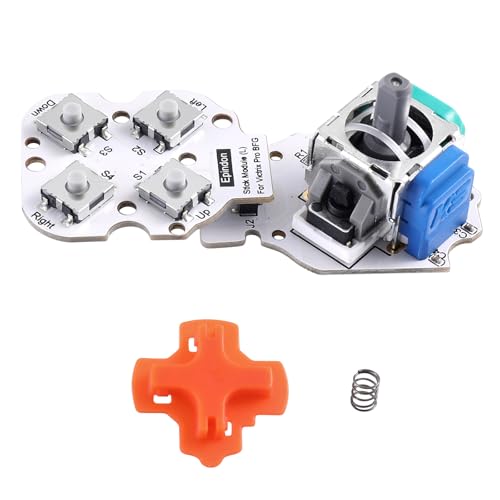
Fix Stick Drift & Conductive Rubber issues. The left stick of the Victrix Pro BFG controller can be replaced if drift or conductive rubber failure occurs.No conductive rubber is required – eliminates wear-related issues permanently. No Drift Hall Effect Sensor Sticks:Revolutionary electromagnetic stick module solves the drifting problem, and increasing the precision and durability.the tactile action buttons reduces response times, making it an essential feature for professional FPS gamers. Improve module issues such as drift by replacing existing module on the Left stick。 Easily installation. Unscrew the screws of faceplate and stick module PCB board with attached T2.0 driver; Replace the stock module with Epindon customized hall effect electromagnetic module.【Attention : 】please insert and remove connector pins of left stick module slowly. Calibration is required after installation. Calibration method: Press the L( R )stick and function button at the same time, the function button LED will flash. At that time, turn the L(/ R) stick left (counterclockwise) and right (clockwise) 3 times each. Then press the function button again, the white LED will turns off to complete the module Calibration. 【Note】: 1).Always place the VICTRIX PRO BFG controller on a flat, level surface when performing reset/calibration. Multiple reset attempts may be required. 2). our stick modules is tested and 1 month warranty;If any questions or concerns , Please contact: [email protected].
 Related results
 Product specifications


