
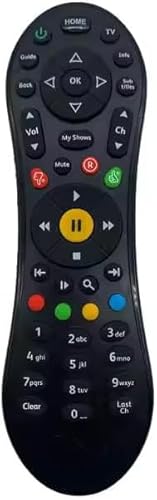
Genuine New Virgin Media Compatible V6 Remote Control Batteries & Set up Guide Included
Prices from
13.95
Featured

|
£ 13.95 |
To Shop
|

|
£ 13.95 |
To Shop
|
| COMPARE ALL WEBSHOPS (2) | ||
 Description
Amazon
👉 Batteries Included + Easy Setup Guide: Comes ready to use with batteries and a simple step-by-step guide to get you started instantly. ✔️Pairing Guide: Using the Virgin TV remote, press the ‘Info’ button for 7 seconds, After 7 seconds the light at the top of the remote should flash green twice, that means is paired. OR FOLLOW THE VIDEO GUIDE LINK: Copy and Paste ====> https://www.virginmedia.com/help/how-to/guides/tv/controlling-the-tv/v6/advice


 Description
(1)
Description
(1)
👉 Batteries Included + Easy Setup Guide: Comes ready to use with batteries and a simple step-by-step guide to get you started instantly. ✔️Pairing Guide: Using the Virgin TV remote, press the ‘Info’ button for 7 seconds, After 7 seconds the light at the top of the remote should flash green twice, that means is paired. OR FOLLOW THE VIDEO GUIDE LINK: Copy and Paste ====> https://www.virginmedia.com/help/how-to/guides/tv/controlling-the-tv/v6/advice
 Product specifications
 Related results
Featured Choice
£ 13.95


