
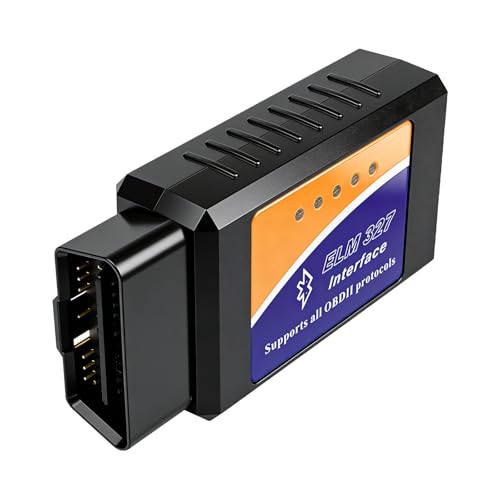
OBD2 Bluetooth Scanner,OBD2 Adapter V1.5,Wireless Car Diagnostic Scanner Code Reader for iOS iPhone Android Windows,OBD II Tool Supports All Vehicles with OBDII Protocol
Featured

|
£ 8.49 |
To Shop
|

|
£ 8.49 |
To Shop
|
| COMPARE ALL WEBSHOPS (2) | ||
 Description
Amazon
Compatible Models: This Bluetooth OBD2 Scanner is compatible with all vehicles adhering to the OBDII protocol, suitable for American-made models manufactured from 1996 onwards and European models produced from 2003 onwards. Whether new or older vehicles, petrol engines or 12V light-duty diesel engines, they will all pair seamlessly with our OBD2 scanner. Quick Diagnosis: The Bluetooth OBD2 adapter swiftly reads and clears engine fault codes, monitors sensor data in real time and synchronises it to your mobile phone, helping determine whether your vehicle meets emissions testing standards. By enabling precise diagnostics to support self-repairs, it effectively reduces vehicle maintenance costs. Compatible with Android and iOS systems: This WiFi OBD2 scanner V1.5 supports multiple mainstream free applications across iOS and Android platforms. Android users (for Samsung, LG, Google and other brands of mobile phones/tablets and Windows computers) may utilise ‘Torque’, ‘DashCommand’ and ‘OBD Fusion’. iOS users may select applications such as ‘Car Scanner’, ‘OBD Auto Doctor’, ‘OBD Fusion’, “DashCommand” and ‘inCarDoc’. Support ALL 9 OBDII Protocols: This OBD2 car code reader fully supports all nine mainstream OBD2 communication protocols, including ISO15765-4 (CAN), ISO14230-4 (KWP2000), ISO9141-2, J1850 VPW and J1850 PWM, ensuring broad compatibility. It also offers a multilingual interface covering English, German, Spanish, French, Italian, Dutch, Portuguese and more, significantly lowering language barriers during use. Easy to Operate: 1. Insert the scanner into the vehicle's OBD2 port (typically located beneath the driver's side dashboard). 2. Switch on the vehicle's power supply (ignition not required). 3. Enable WiFi on your mobile phone or tablet, then search for and connect to the device. 4. Launch the corresponding OBD2 application (e.g., Car Scanner, Torque, etc.). 5. Within the app, select ‘OBD2’ or a similar option to establish connection (if prompted for a password, try 1234 or 0000). 6. Wait for the app to connect with the vehicle's ECU and retrieve data. 7. When finished, promptly remove the scanner. Leaving it plugged in for extended periods may cause the vehicle battery to slowly drain.


 Description
(1)
Description
(1)
Compatible Models: This Bluetooth OBD2 Scanner is compatible with all vehicles adhering to the OBDII protocol, suitable for American-made models manufactured from 1996 onwards and European models produced from 2003 onwards. Whether new or older vehicles, petrol engines or 12V light-duty diesel engines, they will all pair seamlessly with our OBD2 scanner. Quick Diagnosis: The Bluetooth OBD2 adapter swiftly reads and clears engine fault codes, monitors sensor data in real time and synchronises it to your mobile phone, helping determine whether your vehicle meets emissions testing standards. By enabling precise diagnostics to support self-repairs, it effectively reduces vehicle maintenance costs. Compatible with Android and iOS systems: This WiFi OBD2 scanner V1.5 supports multiple mainstream free applications across iOS and Android platforms. Android users (for Samsung, LG, Google and other brands of mobile phones/tablets and Windows computers) may utilise ‘Torque’, ‘DashCommand’ and ‘OBD Fusion’. iOS users may select applications such as ‘Car Scanner’, ‘OBD Auto Doctor’, ‘OBD Fusion’, “DashCommand” and ‘inCarDoc’. Support ALL 9 OBDII Protocols: This OBD2 car code reader fully supports all nine mainstream OBD2 communication protocols, including ISO15765-4 (CAN), ISO14230-4 (KWP2000), ISO9141-2, J1850 VPW and J1850 PWM, ensuring broad compatibility. It also offers a multilingual interface covering English, German, Spanish, French, Italian, Dutch, Portuguese and more, significantly lowering language barriers during use. Easy to Operate: 1. Insert the scanner into the vehicle's OBD2 port (typically located beneath the driver's side dashboard). 2. Switch on the vehicle's power supply (ignition not required). 3. Enable WiFi on your mobile phone or tablet, then search for and connect to the device. 4. Launch the corresponding OBD2 application (e.g., Car Scanner, Torque, etc.). 5. Within the app, select ‘OBD2’ or a similar option to establish connection (if prompted for a password, try 1234 or 0000). 6. Wait for the app to connect with the vehicle's ECU and retrieve data. 7. When finished, promptly remove the scanner. Leaving it plugged in for extended periods may cause the vehicle battery to slowly drain.
 Product specifications
 Related results


