








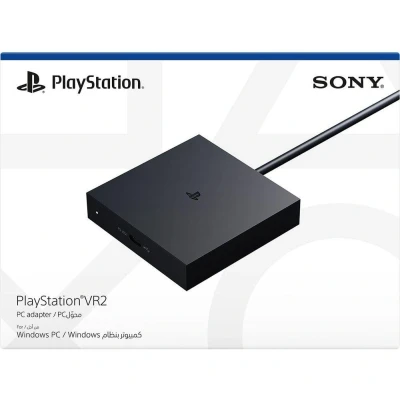
PSVR2 PC Adapter
Featured

|
£ 39.99 |
To Shop
|

|
£ 49.99 |
To Shop
|
 Description
Experience an expansive library of virtual reality gaming with the PlayStation®VR2 PC Adapter. This innovative accessory allows you to connect your PlayStation VR2 headset to a Windows PC, enabling access to thousands of VR titles available on Steam™. Delve into a variety of genres, from multiplayer open worlds and survival horrors to stealth action, sports simulations, quirky puzzle games, and free-to-play epics. With the PlayStation VR2, your immersive gaming experience reaches new heights as you explore the vast and diverse range of virtual reality content that Steam has to offer.
Easy Setup and Connectivity
Setting up the PlayStation VR2 with your PC is straightforward. Simply connect the PC adapter to your headset and your computer. You'll need to download the SteamVR™ App and the free PlayStation VR2 App from Steam. Once everything is connected, you can effortlessly browse, purchase, and play a wide range of VR games. The PlayStation VR2 PC Adapter makes the transition seamless, allowing you to dive straight into the action without hassle.
Specifications and Requirements
For optimal performance with your PlayStation VR2 setup, ensure that you meet the following minimum PC requirements:
- Operating System: Windows 10 64bit or Windows 11 64bit
- Processor: Intel Core i5-7600 or Ryzen 3 3100 (Zen2 or later architecture)
- RAM: 8 GB or more
- GPU: NVIDIA GeForce GTX 1650 or later, NVIDIA RTX series, AMD Radeon RX 5500XT or later
- DisplayPort: Must have a standard DisplayPort 1.4 or Mini DisplayPort output port
- USB: Direct connection only
- Bluetooth: Bluetooth 4.0 or later (for compatibility with specific adapters)
It’s recommended to use an NVIDIA GeForce GTX 3060 or AMD Radeon RX 6600XT for the best performance. Additionally, you will need a commercially available DisplayPort™ cable (sold separately) that is compatible with DisplayPort 1.4.
In the Box
When you purchase the PlayStation VR2 PC Adapter, the box includes:
- PlayStation®VR2 PC adapter
- AC adapter
- AC power cord
- Instruction manual
Important Considerations
Please note that while using the PlayStation VR2 with a PC, certain features such as HDR, headset feedback, eye tracking, adaptive triggers, and haptic feedback (beyond basic rumble) will not be available. An internet connection is required to access Steam™ and its applications.
Whether you're a seasoned VR enthusiast or new to the world of virtual reality, the PlayStation VR2 PC Adapter opens up a plethora of gaming possibilities, making it easier than ever to enjoy thousands of VR titles from the comfort of your own home.


 Description
Experience an expansive library of virtual reality gaming with the PlayStation®VR2 PC Adapter. This innovative accessory allows you to connect your PlayStation VR2 headset to a Windows PC, enabling access to thousands of VR titles available on Steam™. Delve into a variety of genres, from multiplayer open worlds and survival horrors to stealth action, sports simulations, quirky puzzle games, and free-to-play epics. With the PlayStation VR2, your immersive gaming experience reaches new heights as you explore the vast and diverse range of virtual reality content that Steam has to offer.
Easy Setup and Connectivity
Setting up the PlayStation VR2 with your PC is straightforward. Simply connect the PC adapter to your headset and your computer. You'll need to download the SteamVR™ App and the free PlayStation VR2 App from Steam. Once everything is connected, you can effortlessly browse, purchase, and play a wide range of VR games. The PlayStation VR2 PC Adapter makes the transition seamless, allowing you to dive straight into the action without hassle.
Specifications and Requirements
For optimal performance with your PlayStation VR2 setup, ensure that you meet the following minimum PC requirements:
- Operating System: Windows 10 64bit or Windows 11 64bit
- Processor: Intel Core i5-7600 or Ryzen 3 3100 (Zen2 or later architecture)
- RAM: 8 GB or more
- GPU: NVIDIA GeForce GTX 1650 or later, NVIDIA RTX series, AMD Radeon RX 5500XT or later
- DisplayPort: Must have a standard DisplayPort 1.4 or Mini DisplayPort output port
- USB: Direct connection only
- Bluetooth: Bluetooth 4.0 or later (for compatibility with specific adapters)
It’s recommended to use an NVIDIA GeForce GTX 3060 or AMD Radeon RX 6600XT for the best performance. Additionally, you will need a commercially available DisplayPort™ cable (sold separately) that is compatible with DisplayPort 1.4.
In the Box
When you purchase the PlayStation VR2 PC Adapter, the box includes:
- PlayStation®VR2 PC adapter
- AC adapter
- AC power cord
- Instruction manual
Important Considerations
Please note that while using the PlayStation VR2 with a PC, certain features such as HDR, headset feedback, eye tracking, adaptive triggers, and haptic feedback (beyond basic rumble) will not be available. An internet connection is required to access Steam™ and its applications.
Whether you're a seasoned VR enthusiast or new to the world of virtual reality, the PlayStation VR2 PC Adapter opens up a plethora of gaming possibilities, making it easier than ever to enjoy thousands of VR titles from the comfort of your own home.
 Product specifications
 Price History
  Related results


