






Quad Monitor KVM Switch 4 Monitors 2 Computers 1080P@60Hz,USB 3.0 for PC Share and USB Device,with Wired Remote Cables,Driver Installation is Required
Featured

|
£ 109.99 |
To Shop
|
 Description
Amazon
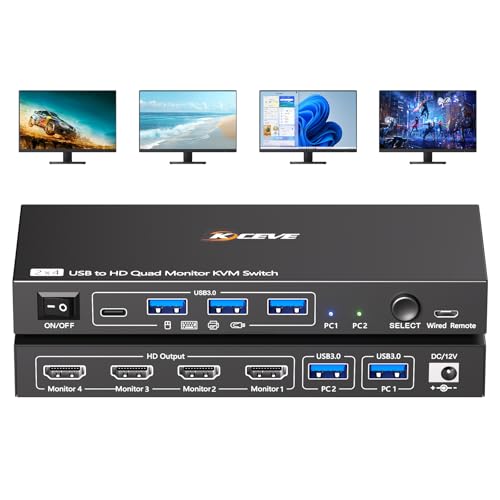
【USB to HDMI KVM Switch 4 Monitors 2 Computers】Each PC only needs 1 USB cable connected to this 4 monitors KVM switch to achieve 4 HDMI monitors output.Supports mirror mode and expansion mode.One-click switching between work and personal computers. 【𝘿𝙧𝙞𝙫𝙚r 𝙄𝙣𝙨𝙩𝙖𝙡𝙡𝙖𝙩𝙞𝙤𝙣 𝙞𝙨 𝙍𝙚𝙦𝙪𝙞𝙧𝙚𝙙】The 4 monitors 2 computers KVM switch supports simultaneous output of 4 HDMI monitors, with resolutions of 4*1080P@60Hz. 𝙉𝙊𝙏𝙀: After connecting your PC to the 4 monitors KVM switch, the PC will automatically recognise the USB device and a pop-up window will appear, please follow the wizard to install the USB driver.This driver does not record any information, Only used for identifying monitors. 【KVM Switch Quad Monitor with 4 USB3.0 Port】The 4 displays KVM switch is euqipped with 4 USB 3.0 ports for connecting keyboard, mice,printer and more. With a data transfer rate of up to 5Gbps,Backward compatibility with USB 1.1/2.0. 【Wide Compatibility & 2 Switching Ways】 The 2 port USB to HDMI KVM switch is effortlessly compatible with Windows and Mac OS. Supports two switching methods—physical button and wired remote—while LED indicators clearly display the active computer. 【𝙄𝙢𝙥𝙤𝙧𝙩𝙖𝙣𝙩 𝙉𝙤𝙩𝙚】 (𝟭)Driver installation is required to recognize the monitors;(2)To get the 2 computers 4 monitors KVM switch work properly, the PC system must be 11th or above;(3)2 USB 3.0 cables in the packaging, but HDMI cables are not included. (4)Not supporting EDID emulation and hotkey switching.Any questions, please tell us, our technical team will reply you within 12 hours. NOTE NOTE NOTE:You need to install a driver on your computer to use this 4 monitor KVM switch (this driver is only used to convert USB to HDMI). If you have any concerns about this, please do not purchase this 4 monitors KVM switch. Thank you.


Compare webshops (1)
 Description
(1)
Description
(1)
【USB to HDMI KVM Switch 4 Monitors 2 Computers】Each PC only needs 1 USB cable connected to this 4 monitors KVM switch to achieve 4 HDMI monitors output.Supports mirror mode and expansion mode.One-click switching between work and personal computers. 【𝘿𝙧𝙞𝙫𝙚r 𝙄𝙣𝙨𝙩𝙖𝙡𝙡𝙖𝙩𝙞𝙤𝙣 𝙞𝙨 𝙍𝙚𝙦𝙪𝙞𝙧𝙚𝙙】The 4 monitors 2 computers KVM switch supports simultaneous output of 4 HDMI monitors, with resolutions of 4*1080P@60Hz. 𝙉𝙊𝙏𝙀: After connecting your PC to the 4 monitors KVM switch, the PC will automatically recognise the USB device and a pop-up window will appear, please follow the wizard to install the USB driver.This driver does not record any information, Only used for identifying monitors. 【KVM Switch Quad Monitor with 4 USB3.0 Port】The 4 displays KVM switch is euqipped with 4 USB 3.0 ports for connecting keyboard, mice,printer and more. With a data transfer rate of up to 5Gbps,Backward compatibility with USB 1.1/2.0. 【Wide Compatibility & 2 Switching Ways】 The 2 port USB to HDMI KVM switch is effortlessly compatible with Windows and Mac OS. Supports two switching methods—physical button and wired remote—while LED indicators clearly display the active computer. 【𝙄𝙢𝙥𝙤𝙧𝙩𝙖𝙣𝙩 𝙉𝙤𝙩𝙚】 (𝟭)Driver installation is required to recognize the monitors;(2)To get the 2 computers 4 monitors KVM switch work properly, the PC system must be 11th or above;(3)2 USB 3.0 cables in the packaging, but HDMI cables are not included. (4)Not supporting EDID emulation and hotkey switching.Any questions, please tell us, our technical team will reply you within 12 hours. NOTE NOTE NOTE:You need to install a driver on your computer to use this 4 monitor KVM switch (this driver is only used to convert USB to HDMI). If you have any concerns about this, please do not purchase this 4 monitors KVM switch. Thank you.
 Product specifications
 Related products


