

£ 3.49

Sponsored links
|
|
£ 3.49 |
To Shop
|

|
£ 8.49 |
To Shop
|
| COMPARE ALL WEBSHOPS (2) | ||
 Description
Compare webshops (2)
Sponsored links · Some shops pay us a fee
£ 3.49
£ 8.49
Shops with other sizes
Description
(1)
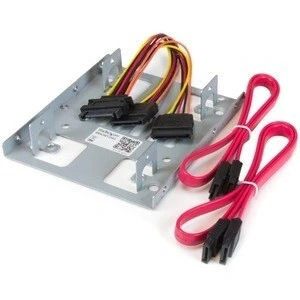
Startech Dual 2.5´´ Sata Hdd To 3.5´´ Mount Bracket Black . Maximize your PC´s storage potential with the StarTech.com Dual 2.5” to 3.5” SATA Hard Drive Mounting Bracket. This essential component lets you install two 2.5” SATA HDDs or SSDs into a single 3.5” drive bay, significantly boosting system performance with SSD speed and optimizing internal space. Its robust all-metal construction ensures secure mounting, while the universal design fits any standard 3.5” bay. Ideal for system builders and enthusiasts, it offers a straightforward upgrade path for faster boot times and application loading. STARTECH Dual 2.5 SATA HDD to 3.5 Mount Bracket - BRACKET25X2Category: ComponentsSubcategory: Internal PC cablesUnlock the full potential of your desktop computer´s storage with the StarTech.com Dual 2.5 to 3.5 SATA Hard Drive Mounting Bracket. This essential component is the ultimate solution for system builders, IT professionals, and performance enthusiasts looking to upgrade their PC with the speed of modern Solid State Drives (SSDs) or expand their storage capacity efficiently. By converting a standard 3.5-inch drive bay into a high-density mount for two 2.5-inch SATA drives, this bracket offers a powerful combination of performance enhancement and space optimization. It´s the perfect tool for breathing new life into an older desktop or for maximizing the internal layout of a new custom build.The BRACKET25X2 Dual hard drive mounting bracket kit lets you install two 2.5in SATA hard drives (HDD) or solid state drives (SSD) into a single 3.5in mounting bay -- enabling you to significantly increase the performance of your desktop by adding the speed of a 2.5in SSD.Maximize the internal mounting space of your computer, by installing two 2.5in hard drives in the same 3.5in bay. The bracket can be used with SATA hard drives and solid states.For a hassle-free installation, the hard drive mounting kit includes all required data and power cabling for both SATA drives.Plus, the bracket can support IDE drives when using our 2.5in to 3.5in IDE Hard Drive cable adapter (IDE4044). Key Benefits & Main FeaturesExperience a significant boost in system responsiveness by installing a high-speed 2.5 Sata SSD for your operating system and applications, while using a second drive for bulk storage. This dual-drive configuration allows you to achieve faster boot times, quicker application loading, and a more fluid computing experience without sacrificing storage space. This mounting bracket is ingeniously designed to consolidate your storage, freeing up other drive bays for future expansion or improved internal airflow. Its robust, all-metal construction ensures your drives are held securely, providing long-term stability and reliability within your PC case. The universal design guarantees a perfect fit into any standard 3.5 drive bay, making it a versatile choice for a wide range of desktop chassis, from full towers to small form factor (SFF) systems.* Dual 2.5 Drive Support: Mount two 2.5 SATA HDDs or SSDs simultaneously in one 3.5 bay.* Performance Upgrade Path: Provides an easy way to add a high-speed SSD to your desktop for enhanced performance.* Space Optimization: Efficiently utilizes your computer´s internal space, ideal for builds with limited drive bays.* Universal Form Factor: Designed to fit perfectly into any standard 3.5 internal drive bay.* Solid and Secure Mounting: Features a durable all-metal frame to ensure your drives are protected and stable.* Broad Compatibility: Fully compatible with all generations of the Sata interface (SATA I, II, III) and a wide variety of 2.5 drives. Technical Specifications* Product Model: BRACKET25X2* Bay Compatibility: Standard 3.5 Drive Bay* Drive Compatibility: 2x 2.5 SATA Hard Drives (HDD) or Solid State Drives (SSD)* Supported Drive Height: Up to 9.5mm* Interface: SATA (Rev. 1.0/2.0/3.0, up to 6 Gbps)* Material: SPCC Steel. tradeinn Techinn
 Product specifications
| Brand | Startech |
|---|---|
| EAN |
|
| Material |
|
| Color |
|
| Size |
|
| Gender |
|
| MPN |
|
 Price History
Prices were last updated on:
 Related results


