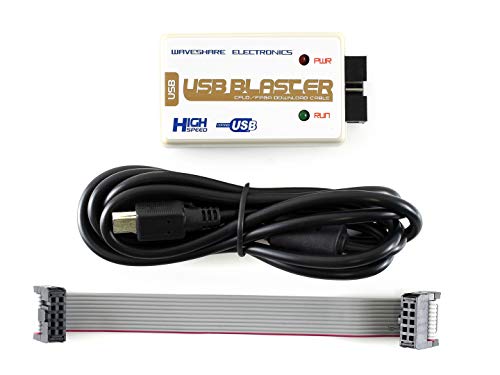


Waveshare USB Blaster V2 Download Cable, a High-Speed FT245+CPLD Solution, Compatible with FPGA/CPLD Programmer
Prices from
COMPARE ALL WEBSHOPS
(1)
Amazon
The USB Blaster Download Cable interfaces a USB port on a host computer to FPGA mounted on a printed circuit board. The cable sends configuration data from the PC to a standard 10-pin header connected to the FPGA. You can use the USB Blaster cable to iteratively download configuration data to a system during prototyping or to program data into the system during production. It surpports FPGA/CPLD devices, Active Serial Configuration Devices, Enhanced Configuration Devices, and supports AS, PS, JTAG three download modes. LED Status:Red LED: Power indicator; Green LED: Signal indicator, the LED is on while downloading/programming
Read more
31.99
Featured
|
£ 31.99 |
To Shop
|
Description
Amazon
The USB Blaster Download Cable interfaces a USB port on a host computer to FPGA mounted on a printed circuit board. The cable sends configuration data from the PC to a standard 10-pin header connected to the FPGA. You can use the USB Blaster cable to iteratively download configuration data to a system during prototyping or to program data into the system during production. It surpports FPGA/CPLD devices, Active Serial Configuration Devices, Enhanced Configuration Devices, and supports AS, PS, JTAG three download modes. LED Status:Red LED: Power indicator; Green LED: Signal indicator, the LED is on while downloading/programming
Compare webshops (1)
Shop
Price
The USB Blaster Download Cable interfaces a USB port on a host computer to FPGA mounted on a printed circuit board. The cable sends configuration data from the PC to a standard 10-pin header connected to the FPGA. You can use the USB Blaster cable to iteratively download configuration data to a system during prototyping or to program data into the system during production. It surpports FPGA/CPLD devices, Active Serial Configuration Devices, Enhanced Configuration Devices, and supports AS, PS, JTAG three download modes. LED Status:Red LED: Power indicator; Green LED: Signal indicator, the LED is on while downloading/programming