


£ 14.99

Sponsored links
|
|
£ 14.99 |
To Shop
|

|
£ 14.99 |
To Shop
|
| COMPARE ALL WEBSHOPS (2) | ||
 Description
Compare webshops (2)
Sponsored links · Some shops pay us a fee
£ 14.99
£ 14.99
Shops with other sizes
Description
(1)
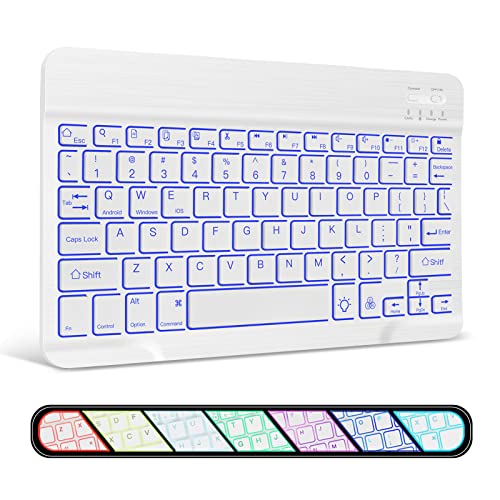
Broad Compatibility: Compatible with Bluetooth enabled devices. iOS, Android, and Windows Tablets, Laptops and mobile Phones. such as iPad 11-inch 11th generation A16 2015, iPad 10.2 9th/8th/7th generation, iPad 10.9 10th generation 2022, iPad air 13/11/10.5, iPad Pro 13/12.9/11,iPad mini 5 2019, iPad 9.7, iPhone Xs Max, for Samsung Galaxy Tab A9+,S10+,S9,S9 fe, S9+, S9 fe+,S6 Lite, S7, S7+, S8, S8+, S7 FE, A8, A7 Lite, A7, for Samsung Galaxy Z Fold4, surface pro, surface go and etc. 7-Color Backlight Wireless Keyboard: The wireless Bluetooth keyboard has 7-color LED backlight with breathing lights and constant light modes. Adopts a scissor-switch mechanism, making you immerse the colorful environment easily even you are in the dark. enables silent typing and efficient work. Switch Between 3 Devices Fast: Wireless Bluetooth Connection, Operating distance up to 10 meters. Just press Fn +Q/W/E to switch between 3 devices instantly. To make it even easier, every time you connect this keyboard with your device, it remembers the device so you can start typing instantly. Portable Bluetooth Keyboard: Stay mobile with your work, from the coffee shop to the airport, at home and back to the office. Measuring a slight 9.6 X 5.7 X 0.24 inch and weighing a mere 0.44 lb, it’s no trouble at all to slip into a bag or your luggage for a quick change of scenery, you can work anywhere. Rechargeable Bluetooth Keyboard: Built-in 450mAh Rechargeable Battery, it will be fully charged in 2 hours, and will support 10 days constantly work and stand by for at least 3 months. With the Smart auto sleep feature design for power saving, the Bluetooth keyboard will enter auto sleep mode after 10-mins of inactivity. just need one touch to wake the keyboard up. Some symbols to enter:Go to Settings-General-keybard, add new keyboard English (US) ✅NOTE: The Keyboard is US layout. Symbols will as same as keyboard shows when use English(US) input language, like @ " symbols. Go to Settings-General management-Languages and types, click manage input languages, add English(US), then you will get correct symbols. If you want to get £ on #, you can change the input language to English(UK). Press Fn+Android/IOS/Windows keys turn keyboard to your tablet's system before typing.
 Related results
 Product specifications


