
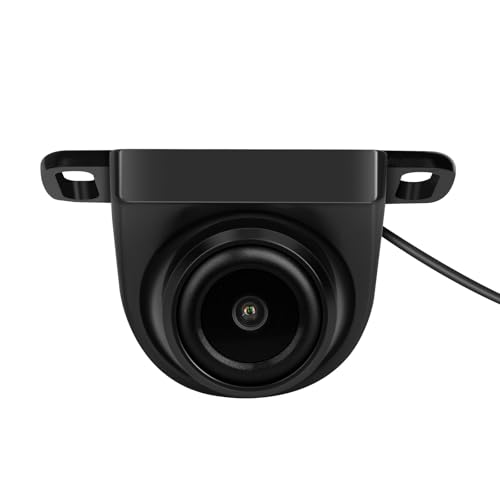
XTRONS 1080P AHD Car Reversing Camera with 360 Adjustable Lens, IP68 Waterproof, Built in CMOS Sensor, 120 Wide Angle, Advanced Noise Cancellation for Head Unit
Featured

|
£ 21.86 |
To Shop
|

|
£ 21.86 |
To Shop
|
| COMPARE ALL WEBSHOPS (2) | ||
 Description
Amazon
【Stunning Video Quality】1920x1080 AHD camera for crystal-clear images. If the image is blurry, please try connecting the Reversing Camera Power Filter Box (ASIN: B09NR9JGJC) 【Advanced Noise Cancellation】Enjoy minimal noise and enhanced clarity. 【Versatile Lens Adjustment】45° extensive angle adjustment, 360° customizable lens for optimal viewing angles.(※Loosen the screw with a wrench to adjust the angle.) 【Exceptional Low-Light Performance】High-performance CMOS sensor for all lighting conditions. 【Durable & Reliable】IP68 dustproof and waterproof standard for all weather conditions. 【Easy Installation】1. Choose a suitable mounting location and secure the camera. 2. Route the camera video cable. 3. Connect the camera to the main unit. (※ To ensure optimal performance of your system, it is essential to configure the camera type settings on your head unit after installation for specific XTRONS models. Please contact XTRONS support for detailed configuration instructions.) 【XTRONS Professional Service】Backed by professional pre- and post-sales customer support, with a 3-month warranty, connect with us through Amazon email if you have any questions, ensuring a worry-free ownership experience.


 Description
(1)
Description
(1)
【Stunning Video Quality】1920x1080 AHD camera for crystal-clear images. If the image is blurry, please try connecting the Reversing Camera Power Filter Box (ASIN: B09NR9JGJC) 【Advanced Noise Cancellation】Enjoy minimal noise and enhanced clarity. 【Versatile Lens Adjustment】45° extensive angle adjustment, 360° customizable lens for optimal viewing angles.(※Loosen the screw with a wrench to adjust the angle.) 【Exceptional Low-Light Performance】High-performance CMOS sensor for all lighting conditions. 【Durable & Reliable】IP68 dustproof and waterproof standard for all weather conditions. 【Easy Installation】1. Choose a suitable mounting location and secure the camera. 2. Route the camera video cable. 3. Connect the camera to the main unit. (※ To ensure optimal performance of your system, it is essential to configure the camera type settings on your head unit after installation for specific XTRONS models. Please contact XTRONS support for detailed configuration instructions.) 【XTRONS Professional Service】Backed by professional pre- and post-sales customer support, with a 3-month warranty, connect with us through Amazon email if you have any questions, ensuring a worry-free ownership experience.
 Product specifications
 Related results


