

£ 20.00

Sponsored links
|
|
£ 20.00 |
To Shop
|

|
£ 20.16 |
To Shop
|
| COMPARE ALL WEBSHOPS (2) | ||
 Description
Compare webshops (2)
Sponsored links · Some shops pay us a fee
£ 20.00
£ 20.16
Shops with other sizes
Description
(1)
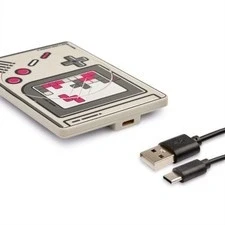
Bring some play to your daily tech routine with the ZipCharger Video Game charging pad, splashing your space with cool gamer vibes and personality every time you power up. Charge your devices at lightning 15W speeds thanks to MagSafe compatibility, keeping you ready for gaming, scrolling or studying without the wait or hassle. Its slim, non-slip surface stays put, and the included USB-C cable means it's easy to set up. Bonus: the packaging is made from 100% recycled materials, ticking the eco-friendly box too. Q: Will this work with my iPhone? A: Yes, this charging pad is MagSafe compatible, so it will magnetically attach to an iPhone 12 or newer for a perfect alignment and a fast, secure charge. It will also wirelessly charge any iPhone from the iPhone 8 onwards. Q: Will this work with my Android phone, like a Samsung or Google Pixel? A: Absolutely. As well as being MagSafe compatible, this is a 15W Qi wireless charger. This means it will charge any Android phone or other device that supports standard Qi wireless charging. Q: What does "MagSafe compatible" actually mean? A: MagSafe is a feature that uses magnets to ensure your phone snaps into the perfect position on the charger every time. This creates a secure connection for a more reliable and efficient wireless charge. Q: Does it come with a plug for the wall? A: The charging pad includes a USB-C cable, which you can plug into any USB-C power adapter you already own. A separate wall plug is not included. Q: How fast will it charge my phone? A: This is a 15W fast wireless charger, which is designed to power up your devices much more quickly than older, standard 5W chargers. The exact speed will depend on your phone, but it's built for a rapid recharge. Q: Can I charge my wireless earbuds on this? A: Yes, you can. The charging pad works with any device that supports Qi wireless charging, which includes the cases for many popular brands of wireless earbuds. Q: Is it easy to set up and use? A: Yes, it's very simple to get started. Just use the included USB-C cable to connect the pad to a power source, then place your compatible device on the surface to begin charging.
 Price History
Prices were last updated on:
 Related results
 Product specifications


