


£ 26.56

Sponsored links
|
|
£ 26.56 |
To Shop
|
| COMPARE ALL WEBSHOPS (1) | ||
 Description
Compare webshops (1)
Sponsored links · Some shops pay us a fee
£ 26.56
Shops with other sizes
Description
(1)
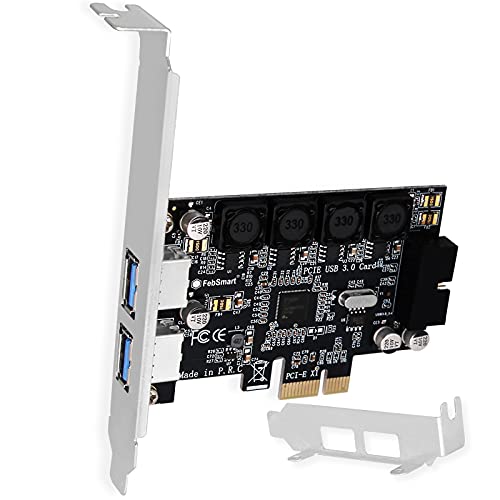
1. This FS-HA-Pro is a PCIE X1 interface for (2 x 5Gbps USB-A expansion cards and 1 x USB 3.0 19-pin header) 3.0. The 19-pin USB 3.0 header will extend to the front panel of desktop PC, 2 USB-A ports. Users will add 4 USB-A ports maximum of 5Gbps on computer PCs for large data transfers. It will light up 4 USB 3.0 devices including USB keyboard, USB mice, USB speakers, USB KVM switch, USB hub, USB flash drive, printers, game pad, smartphone, tablet and more USB-A interface devices. 2. Built on FebSmart Self-Powered Technology, users do not need to connect any additional power cord from the PC power unit. Allows each 5Gbps USB-A port to get 5V/2A max power supply (5V/8A total) for USB 3.0 devices that consume high power (does not support fast charging) such as USB industrial cameras, USB VR systems, USB 3.0 NVME cabinets, USB 3.0 SSD/HDD devices, USB 3.0 video adapters, and USB 3.0. universal doc. docdocations. 3. Based on RENESAS UPD720201 5Gbps USB 3.0 host driver, it will be compatible with computer PC with ARM, AMD and Intel hardware platform. FebSmart built-in 4X voltage transformers to collect 12V from the motherboard and covert to 5V/8A in total power supply for 4X USB 3.0 devices power consumption. FebSmart also designed 4X safety electronic fuse, stable 4X voltage capacitor, and 4X voltage stable inductance to protect USB 3.0 devices and users' data safety. 4. Compatible system: 1. Plug and play on Windows 11, 10, 8.x (32/64bit) and Windows Server 2012, 2012R2, 2016, 2019, 2022 systems. 2. Need to install the driver on Windows XP, Vista, 7 (32/64bit) and Windows Server 2003, 2003R2, 2008, 2008R2 (32/64bit) systems. 3. Plug and play in most Linux kernels. 4. Not compatible with MAC OS X. 5. PCIE X1 interface design, works on PCIE slots X1, X2, X4, X8, X16, does not work on PCI slots. Based on PCIE 2.0 standard, it will support PCIE 1.x, 2.x, 3.x, 4.x PCIE slot. The full-height stand mounted on this PCIE USB 3.0 expansion card works on standard-sized PCs. The low profile bracket in the package is compatible with slim PCs. 6. Attention: 1. You need to make sure that the computer PCs have an empty PCIE X1 slot before purchasing. 2. You must install the driver on Windows 7 (32/64bit) and older systems. 3. Slim PC users need to hand change the low-profile bracket. 4. Use USB 3.0 devices to test the connection speed, or you can't get the maximum speed.
 Related results
 Product specifications


